
Every few months the AI tooling scene names a new way of working.
Prompt engineering. Vibe coding. Context engineering. Agentic workflows.
Each one arrives with a manifesto, a wave of LinkedIn posts, and a quiet death about two hype cycles later. So when I say I spent an afternoon doing "loop engineering" on my own blog, I understand the eye roll.
But I think, loop engineering is the one that does not belong on that list, because there is nothing new in it. It is a seventy-five-year-old idea with a git history.
I rebuilt my blog's post editor with it, start to finish, and I want to walk through both the idea and the results.
What loop engineering is
You break the work into small loops. Every loop has four parts:
A hypothesis. One sentence about what this loop will achieve and why it should be safe. "The editor layout can be split from the admin chrome without changing any URLs."
The smallest change that tests the hypothesis.
A verification you named before you made the change. A command, a test, a thing you can observe. Not "it looks done".
A log entry: measured timestamps, what surprised you, what the next loop inherits.
Two hard rules sit on top:
the app must work at the end of every loop; if a loop tears down something that a later loop rebuilds properly, you park the old thing inside the new structure and label it interim.
every loop ends in a commit. If you cannot write the commit message, the loop was too big.
That is the whole mechanism. If it sounds familiar, it should. Here is where it comes from.
Why this is not a trend
After World War II, "Made in Japan" meant cheap junk.
Japanese factories were rebuilding from rubble and their products had a terrible reputation. In 1950, a group of Japanese engineers invited an American statistician named W. Edwards Deming to Tokyo to teach them about quality.
Deming's advice sounded almost too simple. The way factories worked back then: produce a huge batch of parts, inspect the pile at the end, throw away the bad ones. Deming said that inspecting at the end is too late. The defect already happened, you already paid for it, and the pile is too big to tell you which step caused it.
Instead, work in small cycles. Plan one small change to the process. Make it. Check the result right away. Then act on what you learned and start the next cycle. Plan, do, check, act. Over and over.
Toyota took this seriously. Their workers could stop the entire production line the moment something looked wrong, because one bad part caught now is cheaper than a thousand caught at the end.
Thirty years later, "Made in Japan" meant the most reliable cars on the planet, and American executives were flying to Tokyo to learn the lesson back from the people they taught.
Software keeps rediscovering the same idea under different names. Test-driven development is Deming's cycle where the check is written before the change.
Small commits, continuous integration, "keep the main branch always green": all of it is the same bet, that many small verified steps beat one big inspected pile.
So what do coding agents change? One thing only: the "do" step became almost free. That matters more than it sounds.
When making a change was expensive, we made batches bigger to save on the cost, and big batches made the checks lazy. You cannot precisely verify a week of work, so you eyeball it and ship. Now the agent produces the change in minutes, which means there is no excuse for big batches anymore, and your own time goes where the machine is weakest: deciding what to try, and proving that it worked.
Loop engineering is just plan-do-check-act for an agent session.
That is why I say it is not a trend. Trends need something new to ride on, and they die when that new thing changes.
This idea survived factories, assembly lines, and every programming fashion since punch cards. It does not depend on GPT-anything.
It depends on two things that are not going away: changes being cheap, and honesty about whether they worked.
The contrast with vibe coding makes it concrete.
Vibe coding treats the session as one long wish: describe the outcome, accept what comes back, patch the vibes when something breaks. It works right up until the feature touches something you cannot afford to break.
The experiment: my post editor
The subject was the worst part of my admin panel.
When I moved my blog off a hosted platform onto my own Next.js app earlier this year, the post editor came out as one 539-line React component: writing area squeezed next to an 18rem sidebar holding the publish button, schedule form, newsletter send, slug, excerpt, feature image, tags, and delete.
Links went through window.prompt. Deleting went through window.confirm. It worked, and I hated using it.
The goal was a calm, writing-first editor, built from screenshots I had taken of an editor I liked. The feature scope also included an Unsplash integration for searching and inserting photos, one of the conveniences I missed most, and it got its own loop from the start.
Good candidate for the experiment: real stakes, real reference material, a clear definition of done. The agent running the loops was Claude Fable 5 in Claude Code.
The prompt does the thinking
Loop engineering starts before the session. I wrote a prompt file with the goals, the screenshots, the hard rules (tenant isolation stays intact, no schema changes unless forced), a numbered list of 14 behaviors that had to end up covered by tests, and a required loop log. It also named the loops up front. This is the exact list from that file:
Baseline loop: read the existing editor, actions, schema, and screenshots. Write the intended component split and acceptance checks.
Shell loop: implement top bar and focused writing canvas. Verify render, responsiveness, and save state.
Settings loop: move metadata into the settings panel. Verify existing metadata behavior still works.
Insert loop: implement the plus menu and supported actions. Verify keyboard and mouse behavior.
Unsplash loop: add the server-side Unsplash API boundary, search UI, insertion behavior, attribution, and mocked tests.
Publish loop: implement the guided publish flow. Verify publish, schedule, newsletter, and error states.
Test loop: add test setup and cover the required behavior. Keep iterating until tests, lint, and typecheck pass.
Polish loop: run the UI locally, compare against screenshots, fix spacing, contrast, focus states, copy, and responsive behavior.
Notice what each line carries: a scope and a verification. Not one loop says "make it good".
The baseline loop paid for the whole method
Loop 1 wrote no code, and it was the highest-value half hour of the project. Exploring the codebase before planning found that the Tiptap v3 bubble and floating menu packages were already installed as optional dependencies, and that my .prose-post CSS already styled figure and figcaption, which later made Unsplash photo attribution almost free.
It also found a live bug: the ref mirroring editor metadata for autosave was updated in a useEffect, one render behind the state. Nothing had ever hit that window. The new publish flow, which writes a flag and immediately flushes, would have hit it on day one.
The baseline loop is also where open decisions get forced to the surface. Four questions came back before any code, and one changed the whole visual direction: my reference screenshots are dark, my admin is light. I chose to keep the admin light and copy the layout, not the palette. Without the question I would have gotten a dark editor bolted onto a light admin, and I would have accepted it, because by then it would have been built.
The middle loops
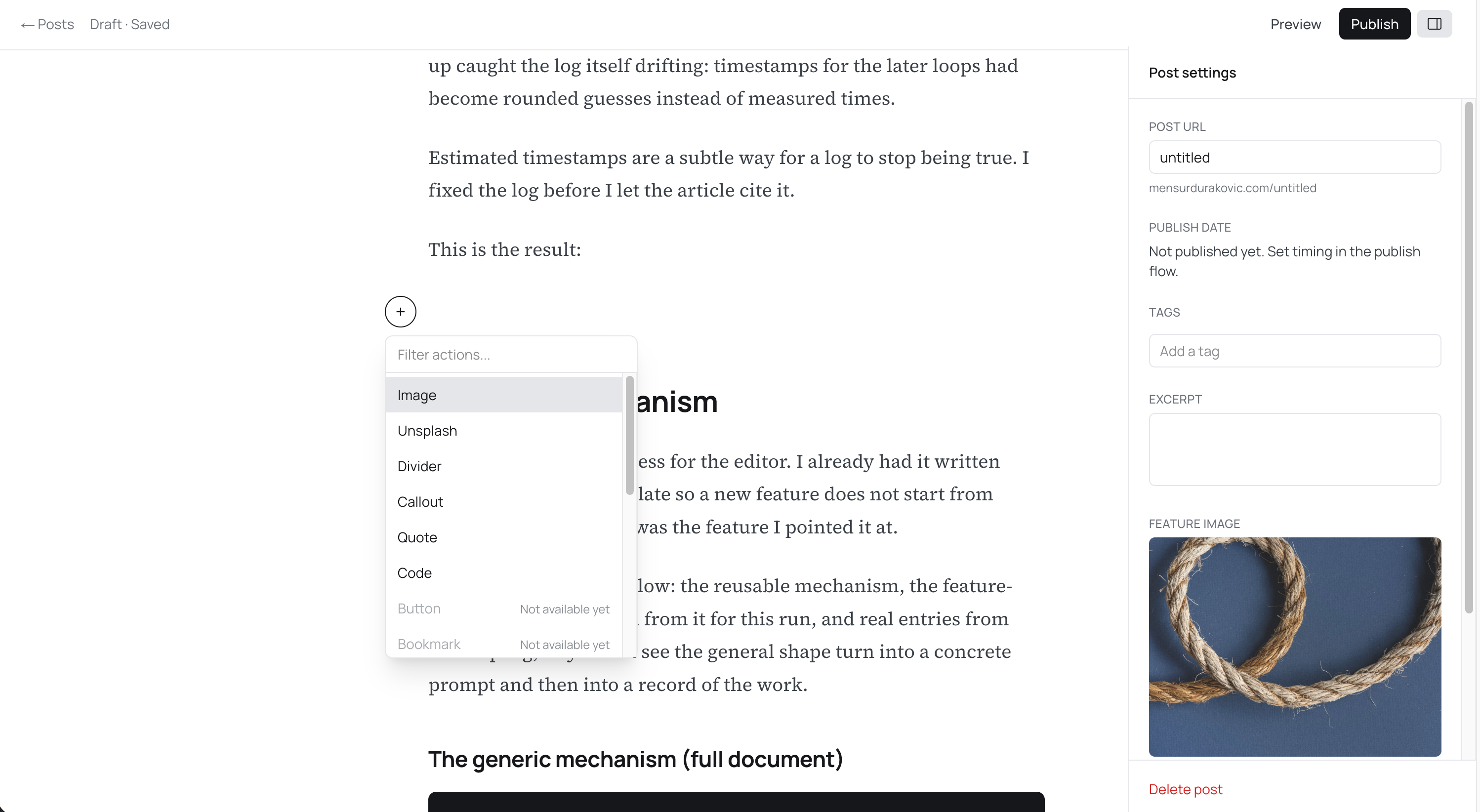
Loops 2 through 6 built the thing: full-bleed editor route with a top bar (Draft · Saved, Preview, Publish, settings toggle), metadata moved into a drawer, a floating plus button that opens a filterable insert menu, a bubble menu with an inline link form, and a publish flow that no longer publishes on click.
It opens a review screen instead: what to do (publish and email, publish only, email only), who gets it (all confirmed subscribers, with email options disabled and explained when the count is zero), when (now or scheduled), then a final step whose button says exactly what will happen: Publish now, Publish and email now, Schedule post, Send email.
Unsplash grew from a planned disabled menu item into a real integration mid-project, because my developer key got approved.
The key stays server-side behind two authenticated route handlers, and the download-tracking endpoint validates that the URL it is asked to hit points at api.unsplash.com, because that value round-trips through the client and I did not want to ship a server-side request forgery as a bonus feature.
Each loop ended with its named verification. The one worth stealing: before trusting the new figure and callout nodes, loop 4 ran a script through the real shared extension list, JSON to HTML back to JSON, and confirmed a figure comes back as a figure and existing content is untouched.
That extension list also feeds my content importer and server-side rendering. Assuming instead of checking there is the kind of bug you find in production, in old posts, weeks later.
Verification
Across the loops the checks got progressively more real.
Typecheck and lint on every loop. Targeted scripts for logic you cannot see. Then a test loop: this repo had no test suite at all, and it got Vitest and 54 tests, the most important of which assert ordering rather than existence. savePost must persist the email flag before publishPost fires; the test pins the invocation order, and it exists because of the one-render-behind bug from loop 1.
The polish loop drove headless Chrome against the dev server with a signed session cookie, created a fresh post, opened every menu, inserted a callout, searched Unsplash for coffee, picked a photo, verified the rendered attribution, and deleted the post through the new two-step confirm.
The first scripted attempt failed because the caret landed in a non-empty paragraph and the plus button correctly refused to appear. It was fixed.
The receipts
Loops 2 through 8 took about 45 minutes of wall clock against a plan that estimated 8 to 11 hours, because the prompt had already done the thinking and the agent parallelizes the boring parts. Eight commits, one per loop. All green.
The log discipline felt like paperwork exactly when I wanted momentum, and it got proportionally worse as loops came in under estimate.
Some failures were pure environment noise no loop prevents: running a production build while the dev server was up corrupted the shared .next directory, and headless Chrome refuses to override the Host header, which matters when your app routes tenants by hostname.
The workarounds are in the log for next time, which is, I suppose, the point.
The tests prove wiring, not editing: Tiptap is mocked, so nothing in CI types a character into ProseMirror; the browser pass covers that but lives as a throwaway script. And re-reading the write-up caught the log itself drifting: timestamps for the later loops had become rounded guesses instead of measured times.
Estimated timestamps are a subtle way for a log to stop being true. I fixed the log before I let the article cite it.
Then the final result:
Steal the mechanism
I did not build this process for the editor. I already had it written down as a generic template so a new feature does not start from scratch, and the editor was the feature I pointed it at.
All three documents follow: the reusable mechanism, the feature-specific prompt written from it for this run, and real entries from the loop log, so you can see the general shape turn into a concrete prompt and then into a record of the work.
The generic mechanism (full document)
# Loop engineering: generic mechanism

A reusable process for implementing any feature with an agent (or alone) as a
series of small, verified loops instead of one long build. The feature-specific
version I wrote from it for the editor is preserved alongside, and the worked
example is the editor's loop-log.md.

## The idea

Every loop has four parts:

1. **Hypothesis.** One sentence: what you believe this loop will achieve and why
   it should be safe ("the layout can be split without changing any URLs").
2. **Change.** The smallest implementation that tests the hypothesis.
3. **Verification.** A named command or check, decided BEFORE the change, that
   proves it worked. Not "it looks done".
4. **Log.** Timestamps, what surprised you, what the next loop inherits.

The app must work at the end of every loop. If a loop replaces something that a
later loop rebuilds properly, park the old thing in the new structure and mark
it interim; never leave a hole.

## How to use

1. Copy the prompt skeleton below into `thoughts/features/<feature>/prompt.md`
   and fill it in. Put reference material (screenshots, links) next to it.
2. Start the agent session in plan mode. Let it explore the codebase and ask
   its questions BEFORE approving the plan. Answer the questions; they are
   cheaper than rework (in the editor run, one question flipped the entire
   visual direction).
3. Approve the plan, then run the loops. One commit per loop, conventional
   message, feature branch, PR at the end.
4. Keep `loop-log.md` in the feature folder, updated at the end of each loop,
   with measured times from `date`, not estimates. Estimated timestamps are a
   subtle way for a log to stop being true.

## Prompt skeleton (copy and fill)

```markdown
# Prompt: <feature name>

You are working in <repo path>, a <stack summary>. Read CLAUDE.md and
<key docs> first. The invariant you must not weaken: <the one rule that,
if broken, is a production incident>.

Your job: <one sentence>. Prove it with tests. Log the work in
thoughts/features/<feature>/loop-log.md.

## Context
- Current implementation lives in: <files>
- What is wrong with it today: <2-4 sentences>
- References: <screenshots/links>, with one line saying what each shows.
  These are intent, not pixels to clone.

## Product goals
<numbered, short. Include "preserve existing behavior: <list>".>

## Requirements
<per area: concrete behaviors. For anything not built yet that will be
visible, say whether to fake it, disable it with an honest label, or omit.>

## Engineering rules
- Stay in the existing stack unless tests require a small addition.
- No schema change unless the UX cannot be built without one.
- <repo-specific rules: lint gates, typing rules, commit style>

## Test requirements
<the runner to use if none exists; then a NUMBERED list of behaviors that
must be covered. Number them: the loop log and the final report will
reference these numbers.>

Run and report: <the exact gate commands, e.g. lint / typecheck / test /
build>.

## Loop engineering process
Work in small loops: hypothesis, change, verification, log. Update
loop-log.md per loop with: loop number, start/end time (measured), the
hypothesis, what changed, what command verified it, what failed or
surprised you, what the next loop inherits.

Suggested loops:
1. Baseline: explore, resolve open decisions with me, write acceptance
   checklist into the loop log. No code.
2..N. <one loop per subsystem, each independently shippable, ordered so
   the app never breaks. Put integrations with external services in their
   own loop. Put "replace the temporary X" explicitly in a later loop.>
N+1. Tests: infrastructure + the numbered list, green gates.
N+2. Real-world pass: drive the actual running app (browser/CLI/API),
   compare against the references, fix what only reality reveals.

Do not skip a loop because the code "looks done".

## Acceptance criteria
<checklist form. The feature is done when every box can be ticked with
evidence: a command, a test, or an observed behavior.>

## Final report
When finished, report: what changed, tests added, verification command
results, known gaps, and anything a reviewer would want flagged.
```

## Loop log template

```markdown
# Loop log: <feature>

## Loop <n>: <name>
- **Start / end:** <measured with `date`, not guessed> (estimate was <x>)
- **Hypothesis:** <one sentence>
- **What changed:** <files/behaviors, compressed>
- **Verified by:** <exact commands + what manual check showed>
- **Failures / surprises:** <the real ones, including environment noise>
- **Next loop:** <what it inherits or must fix>

### Acceptance checks (from prompt.md, tick with the loop that proved each)
- [ ] <criterion> (loop <n>)
```

## Rules of thumb (learned, not theoretical)

- **Exploration before planning finds free wins.** The editor run discovered
  needed packages already installed and CSS that made a feature nearly free,
  and it found a live race condition. Budget a real baseline loop.
- **Force open decisions to the surface before code.** Anything with two
  defensible answers (theme, library, data shape) is a question for the
  human, asked in the baseline loop, recorded as a locked decision.
- **Verification is a pyramid, climb it per loop:** typecheck/lint on every
  loop; a targeted script for logic you cannot see (serialization
  round-trips, API contracts); the test suite for wiring and ordering;
  a real browser/runtime pass for what only reality reveals (a caret in the
  wrong paragraph, an image that will not load, a header Chrome refuses to
  send).
- **Test ordering, not just calls.** The most valuable tests in the editor
  run asserted that the save landed BEFORE the publish action, via mock
  invocation order.
- **Interim UI is fine, silent gaps are not.** Park old controls in the new
  shell with a comment saying which loop removes them.
- **Environment failures go in the log too.** Corrupted build caches, tools
  refusing headers, daemons not running: the log is where the workaround
  lives the next time.
- **Estimates are for ordering, not truth.** Log actuals; expect agent loops
  to come in far under human estimates when the prompt did the thinking.
- **Each loop ends with a commit.** If you cannot write the commit message,
  the loop was too big.
The feature-specific version from the editor prompt (full document)
This is the feature-specific prompt I wrote from the template for this run, reproduced here.
Read them side by side: the generic template states the mechanism in the abstract (the pre-named verification, the baseline questions, the one-commit-per-loop rule, the measured-timestamps rule), while this version turns each of those into concrete, editor-shaped loops.
## Loop engineering process

Use loop engineering deliberately. Treat the work as a series of small loops,
each with a hypothesis, implementation, verification, and adjustment.

Create or update `thoughts/features/post-editor-improvement/loop-log.md` while
working. Keep it concise but real. Record:

- The loop number.
- The hypothesis.
- What changed.
- What command or manual check verified it.
- What failed or surprised you.
- What you changed in the next loop.

Suggested loops:

1. Baseline loop: read the existing editor, actions, schema, and screenshots.
   Write the intended component split and acceptance checks.
2. Shell loop: implement top bar and focused writing canvas. Verify render,
   responsiveness, and save state.
3. Settings loop: move metadata into the settings panel. Verify existing
   metadata behavior still works.
4. Insert loop: implement the plus menu and supported actions. Verify keyboard
   and mouse behavior.
5. Unsplash loop: add the server-side Unsplash API boundary, search UI,
   insertion behavior, attribution, and mocked tests.
6. Publish loop: implement the guided publish flow. Verify publish, schedule,
   newsletter, and error states.
7. Test loop: add test setup and cover the required behavior. Keep iterating
   until tests, lint, and typecheck pass.
8. Polish loop: run the UI locally, compare against screenshots, fix spacing,
   contrast, focus states, copy, and responsive behavior.

Do not skip a loop because the code "looks done". The point of this feature is
to practice the loop: act, inspect, tighten.
The loop log
The log is the artifact, so here is what it actually produces.
Two entries from loop-log.md: the Unsplash loop, a mid-build entry where an external integration got its own verification, and the final browser pass, the entry where reality pushed back.
## Loop 5: Unsplash

- **Start / end:** 2026-07-05 13:41 - 13:45 (estimate 60-90m)
- **Hypothesis:** the key stays server-side behind two authed route handlers
  (same auth as media upload), and insertion is a captioned figure via the
  loop-4 node, so no schema or theme work.
- **What changed:** `lib/unsplash/api.ts` (server-only: `searchPhotos` mapping
  the raw API to a slim `UnsplashPhoto`, `trackDownload`, typed rate-limit
  errors; only the access key is used, never the secret); `lib/unsplash/types.ts`
  (client-safe types); `lib/unsplash/attribution.ts` (pure caption builder with
  the required `utm_source`/`utm_medium` links); `GET /api/unsplash/search`
  (401/403 auth, 503 not-configured, 400 empty query, 429 rate-limit
  passthrough, 502 otherwise) and `POST /api/unsplash/track-download` (SSRF
  guard: https + `api.unsplash.com` host only, best-effort GET, 204);
  `unsplash-search.tsx` panel (idle/loading skeleton/error+retry/empty/results
  grid with photographer names; Escape + outside click close; download tracking
  fired on select); plus-menu item enabled by `unsplashConfigured` from the
  server, otherwise disabled with "Unsplash is not configured"; `.env.example`
  gains `UNSPLASH_ACCESS_KEY`. Added the `server-only` package.
- **Verified by:** typecheck + lint green; live against the real demo key
  (3 requests of the 50/h quota): unauthenticated search 401, empty query 400,
  real search returned mapped results (alt text, regular/small URLs,
  photographer), track-download with a real `download_location` returned 204,
  and the SSRF guard rejected an evil host with 400.
- **Failures / surprises:** `server-only` wasn't installed (repo had never
  needed it); one unused type import after splitting client-safe types out of
  the server module.
- **Next loop:** the guided publish flow.
## Loop 8: Polish and real-browser verification
- **Start / end:** 2026-07-05 14:00 - 14:07 (estimate 45-60m)
- **Hypothesis:** the built UI matches the reference screenshots' intent (in
the light palette) and everything the tests mock actually works in a real
browser.
- **What changed:** almost nothing in code (one tweak: placeholder background
on Unsplash thumbnails while they load). The loop was verification: drove
headless Chrome via playwright-core against the dev server with a signed
session cookie and `--host-resolver-rules` for the tenant host, and captured
every surface.
- **Verified by (screenshots + assertions in the run):**
- Shell: top bar (`Draft · Saved`, Preview, Publish, settings toggle),
centered canvas, feature image above title. Settings drawer desktop and
full-width at 375px.
- Publish flow at 0 confirmed subscribers: email chips disabled with the
explanation, timing chips, `Continue, final review →`. Matches the
reference layout.
- On a fresh post (created and deleted through the UI, including the
two-step delete confirm): plus button appears on the empty paragraph, menu
opens with filter + `Not available yet` items, filtering "call" + Enter
inserted a styled callout; bubble menu appeared over a text selection.
- Unsplash end to end with the real API: search panel, picking a photo
inserted `<figure><img alt="man buying item in shop"><figcaption>Photo by
<a ...utm_source=blog-platform&utm_medium=referral>Blake Wisz</a> on
<a ...>Unsplash</a></figcaption></figure>`.
- **Failures / surprises:**
- Chromium refuses a `Host` header override (`ERR_INVALID_ARGUMENT`);
`--host-resolver-rules=MAP <domain> 127.0.0.1` is the way to hit a tenant
host locally.
- First scripted attempt landed the caret inside a non-empty paragraph, so
the plus button (correctly) stayed hidden; it also left one stray empty
paragraph in the existing gibberish test draft on the local dev DB via
autosave.
- Enter inside a callout continues the callout (same as blockquote); needs a
double-Enter or arrow-down to exit. Accepted as standard Tiptap wrap
behavior.What the excerpts do not show: the log ends with the acceptance checklist from the prompt, each box ticked with the number of the loop that proved it.
When to use loops?
Would I use this for everything?
No.
A one-line fix does not need a hypothesis log, and a process applied where it costs more than it saves is how good ideas turn into cargo cults.
My rule is to use the loop wherever "it looks done" and "it is done" can quietly differ. The editor qualified. It touches publishing, email, and a tenant boundary.
So the next time a feature scares you a little, run one loop before you commit to the whole method. Write the hypothesis, name the check before the change, let the agent do the middle, and log what actually happened.
Worst case, you lose ten minutes to paperwork.
Best case, you catch your own version of my one-render-behind bug while it is still a log entry instead of an incident.